

Payment & Payout Reports
Here we will be going over the Payments Report and the Payouts Report. These tools will be especially useful in tracking transactions.
These reports are only available if you and your customers are utilizing IT-Gig's payment portal powered by Stripe
Payments Report
Want to see if a customer has made a payment using the IT-Gig payment portal? Then this is where you'll want to look.
Start by choosing:
- One or more customers
- A date range
- A payment status
The report will auto populate.
Your Report
After your report is generated, you can review important information regarding each payment.
You can also expand each payment to view the associated invoices.
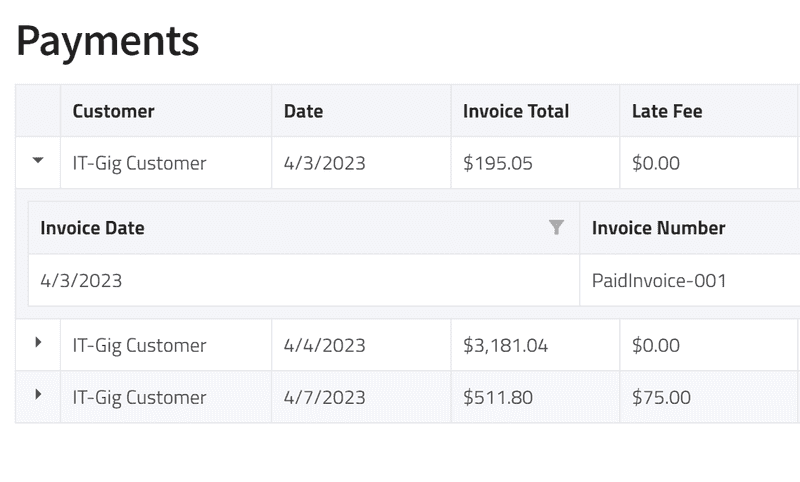
Payment information is pulled directly from Stripe. If you need more information regarding your customer payments, you can do so by logging into your Stripe Portal.
Payouts Report
This report is to help you better understand the money getting deposited into your account after a customer makes a payment.
Stripe, IT-Gig's trusty payment service, will often lump together multiple payments before depositing it into your account as one amount.
This is great and all until you want to know which customer payments make up this payout. Well thats where this useful tool comes to the rescue!
Start by choosing a date range. Then the report will auto populate.
Your Report
After your report is generated, you can review important information regarding each payout.
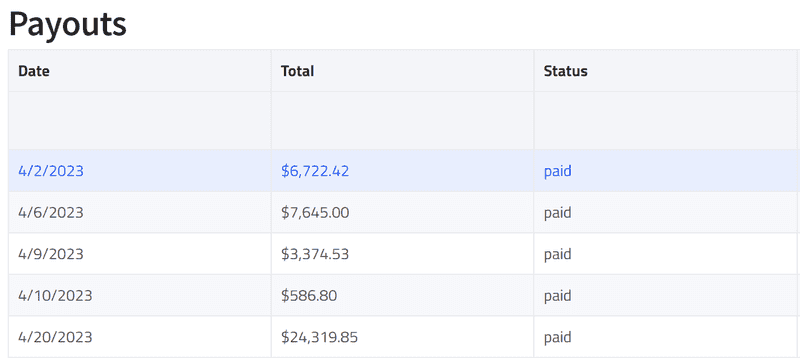
From here you can select a payout to view the associated customer payments, as well as the invoices for those payments. These payments can also be viewed in more detail in the Customer Payments reporting tool, as described in the section above.
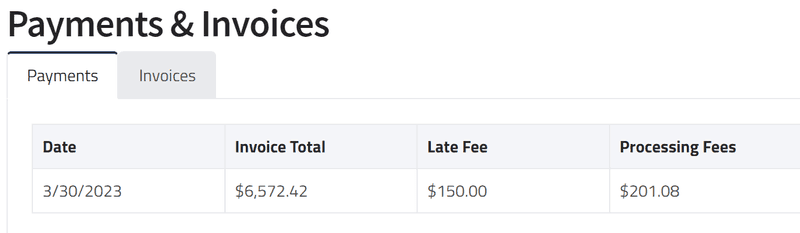
Payment information is pulled directly from Stripe. If you need more information regarding your payouts, you can do so by logging into your Stripe Portal.